Not just any campus. That campus.

A school day.
Working together.

Attendance, schedules and family communication, connected in one workspace for the people who run your school.

Choose principal, teacher, parent or student.No account. Sample data. Read-only.
See the school day in motion

Less chasing.
More moving forward.

From the first register to the next family update, see how the everyday work comes together.

Know exactly
where to act.

Start with the whole school. Choose a class. Reach the register that needs attention.

  1. Find the priorityRegisters grouped by class or period
  2. See the detailSubmission status at the source
  3. Follow throughOpen the register and its recorded decisions
Explore attendance
Attendance walkthrough

Recorded in the ThatCampus demo app

Switch from period to class grouping, expand Class 7A and open its Mathematics register. Sample school data; this preview does not change records.

A place for
every lesson.

See classes in the context of the day. Move between the detail and the whole week.

Timetable walkthrough

Recorded in the ThatCampus demo app

Explore a class timetable and switch between its day and week views. Sample school data; this preview does not change records.

Timeline view available in Experimental settings.

Bring families
into the picture.

Attendance, lessons and requests in a view built around their child.

Family walkthrough

Recorded in the ThatCampus demo app

Explore a parent’s school-day overview and linked attendance information. Sample school data; this preview does not change records.

ThatCampus AI

Ask in context.
Keep people in control.

See a connected attendance workflow: the assistant finds the next overdue register, names who needs a follow-up and prepares a reminder without sending it.

  • Answers grounded in school records
  • Source checks stay visible
  • Proposed changes still require review
AI attendance walkthrough

Illustrative ThatCampus AI interaction

See the assistant identify the next overdue register, answer a follow-up and prepare a reminder for review. Sample school data; this preview does not change records.

AI review walkthrough

Illustrative ThatCampus AI interaction

See how source checks and human approval stay visible beside the assistant’s proposed action. Sample school data; this preview does not change records.

App walkthroughs use synthetic school data. The AI examples are illustrative product interactions; the public demo does not run a model. Play, pause or enlarge any walkthrough.

One campus.
Every perspective.

The same school day, organised around what each person needs to do.

The bigger picture. The next action.

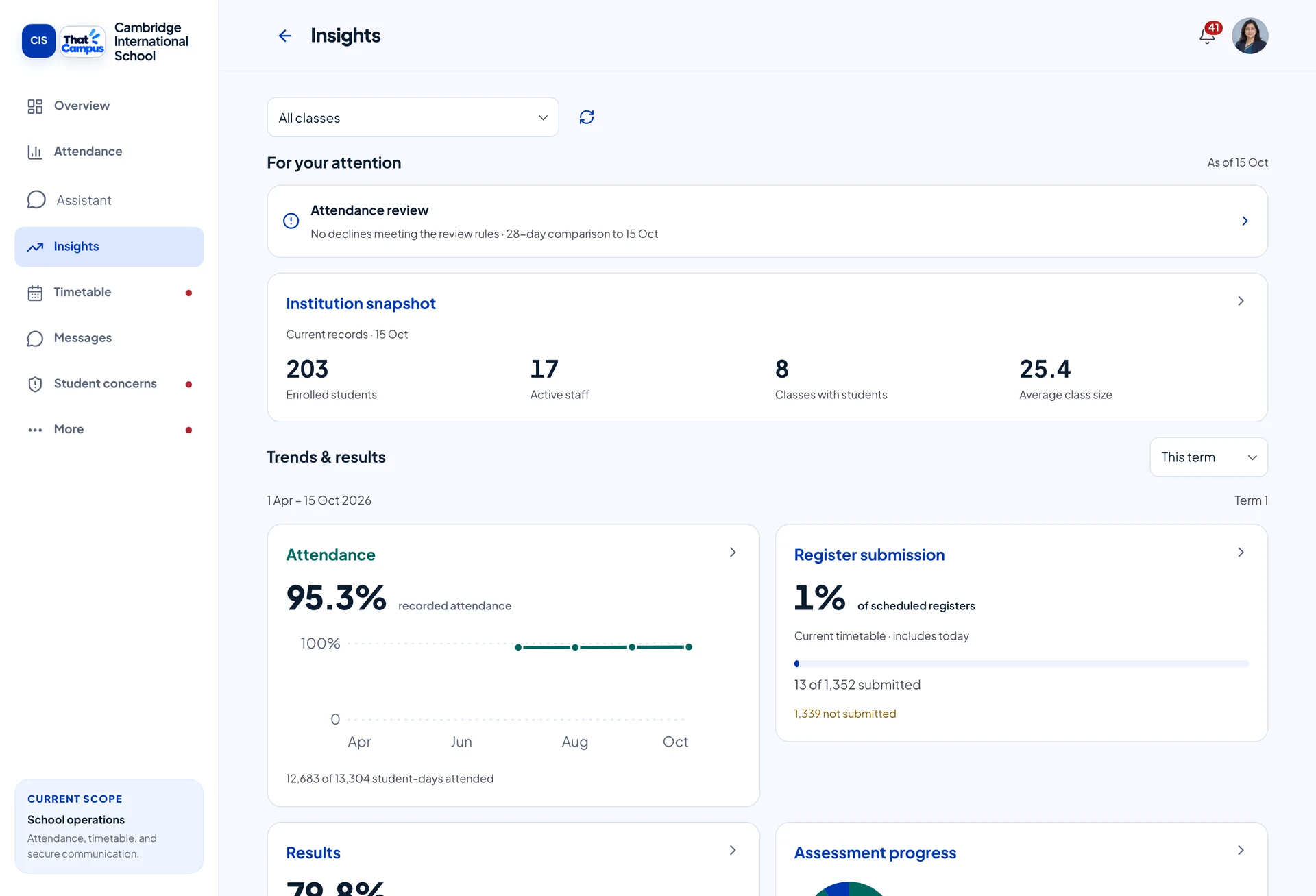
Attendance patterns, assessment results and operational attention in one leadership workspace.

  • See institution and class-level trends
  • Find the work behind the numbers
  • Give your team role-specific access
Real principal workspace with sample school data
Your institution’s way

A shared system.
Your operating rules.

Start with the daily work that matters most to your school. Configure access and supported workflows around your team.

Book a walkthrough
Attendance that fits your day

Daily or subject-wise registers, with configurable submission and finalisation rules.

Access with a purpose

Institution-scoped roles and permissions determine which records and actions each person can use.

An assistant within your team’s access

Ask about school information and request supported actions. The system applies permissions and required review.

Begin with your school

Built around Indian schools. For colleges, coaching centres and universities, we’ll review your attendance and scheduling requirements together.

Online payments are currently in sandbox testing. Product availability depends on your institution’s setup.

Want a closer look?

Explore the actual workspaces.

Open screen gallery

The school day.
All together.

See how ThatCampus brings everyday school work into focus.

Every class. Every learner. A clearer picture.

Open a period. Find the class. See which registers need attention, then follow through to the individual learner.

  • Daily or subject-wise registers
  • Corrections with a recorded history
  • Follow-ups that lead to an outcome

Real ThatCampus screens, captured with demo school data. Select any screen to take a closer look.

A little more room to plan

Give every lesson
its place.

See the week. Open a class. Plan in the space between.
A timeline that puts time back in perspective.

Daily plans. Weekly schedules. One connected calendar.Timeline experience available in Experimental settings.

Different roles.
The same page.

A teacher starts the day. A parent checks in. A principal sees what needs attention. Each person gets a workspace that fits their role.

For school leadersThe overview, the detail, and the next action.

For teachersClasses, attendance and conversations in reach.

For parents and studentsSchedules and updates that keep everyone involved.

And the little things
that make a big day.

Just ask ThatCampus.

Find school information, work through a question and request actions in a conversation. The assistant works with your access.

Watch the AI walkthrough

Notices & conversations

School announcements, family messages and responses, connected to the people they’re for.

Leave & staff coverage

Requests, decisions and cover arrangements that keep the day moving.

Your institution’s way

Roles, permissions and operating rules shaped around how your school works.

Academics & administration

Assessments, report cards, people and fee records within the same platform.

We’ll confirm the right setup for your institution during your demo. Online payments are currently in sandbox testing.

Made for the people behind the day

More time for
what school is for.

ThatCampus brings the work around learning together, so the people who teach, care and lead can spend less time chasing information.

Built around the everyday needs of Indian schools. For colleges and other institutions, we’ll explore your attendance, scheduling and communication needs with you.

Let’s meet your campus

See your school
in ThatCampus.

Leave one way to reach you. We’ll arrange a walkthrough around your school day.

Want to look around on your own? Open the four-role public demo—no account or contact details needed.

Try the public demo

Book a personal walkthrough

Just your email or phone. Nothing else.

Connecting to the enquiry service...
ThatCampus Demo school